- You can send and receive texts on Gmail for free by using a simple mailing trick.
- Enable SMS in Google Chat, then compose a message in Gmail and enter the recipient’s mobile number with carrier address.
- Type your message and click send to send a text SMS using your Gmail account for free.
How to Send Text SMS using Gmail Account Free
Inside iHacks: Gmail is giant network that provides lots of services to its users and we here will be talking one of the cool service. And that is sending text SMS from gmail. Yes you can easily send text messages using your gmail account and you will not get any charge of doing this.
The method to send SMS using Gmail is very easy and you just need a mailing trick that will send your SMS to the target mobile number and the complete method is discussed in below steps. Follow them all and enjoy free messaging services.
Steps To Send Text SMS Using Gmail Account Free:
Also Read: How To Make Free Calls Using Gmail
#1. First Follow Below Steps To Enable SMS in Google Chat:
After you have logged in to your Gmail account click on the gear icon on the upper-right corner of your screen.
Click on ‘ Settings ’. Wait while you are redirected to the Settings page.


Out of the several tabs you see, click on ‘ Labs ’.
Look for SMS (text messaging) in Chat. Use Ctrl+F to enable search and then type SMS (text messaging) in Chat. You’ll see this:

- Click on ‘ Enable ’.

- Save settings by pressing the ‘Save changes’ button.
#2. Now Follow Below Steps To Send Text SMS using Gmail Account Free:
Also Read: How To Hack Android Game Without Root
First if all login into account from which you want to send free SMS using Gmail.
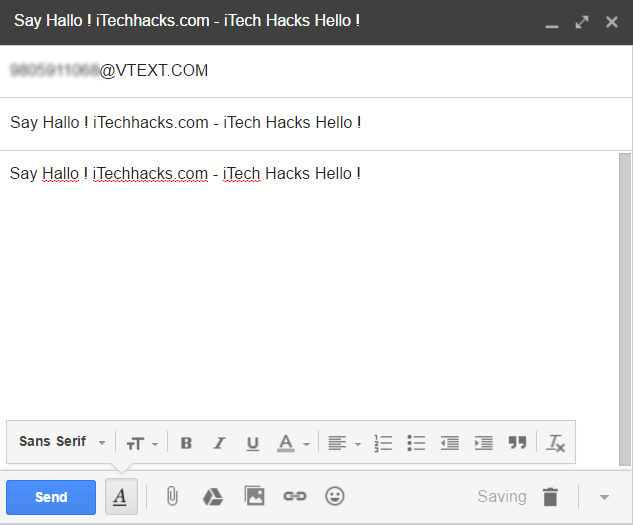
Now in your account click on compose button and sending mail dialog pop up will appear.
Now in the field To you will write the mobile_number@carrieraddress according to your carrier addresses given below:
-> AT&T: [email protected] -> T-MOBILE: [email protected] -> VERIZON: [email protected] -> SPRINT: [email protected] OR [email protected] -> VIRGIN MOBILE: [email protected] -> TRACFONE: [email protected] -> METRO PCS: [email protected] -> BOOST MOBILE: [email protected] -> CRICKET: [email protected] -> NEXTEL: [email protected] -> ALLTEL: [email protected] -> PTEL: [email protected] -> SUNCOM: [email protected] -> QWEST: [email protected] -> U.S. CELLULAR: [email protected]
- Now type the message in the message box below and just click on send button.
Also Read: How To Increase RAM in PC 20GB+ Easily
- That’s it you are done, now your message will get sent to the number for free of cost using your gmail account. 6. If your carrier address is not listed above then you can search out your specific carrier messaging address.
How to Send SMS from Gmail?
