- Reddit introduces Night Mode for its Smartphone application and Website version as a Dark mode option.
- To enable Night Mode on Reddit Website, navigate to the website, log in, click on the three-line icon, select Settings, and check the Night mode checkbox.
- For Android and iOS devices, download the Reddit app, log in, access Settings, and toggle the Dark mode option to enable Night mode. Additional features like Sunrise/sunset option are available for automatic mode switching.
Almost every smartphone application and website introduces the Dark mode as an option. Reddit has also introduced the Dark mode for its Smartphone application and the Website version. But Reddit calls it ‘ Night mode ‘ and not Dark mode.
Reddit also provides additional features for its smartphone application which include the Sunrise/sunset option which can be used to enable the Night mode after sunset. Below, we have listed the steps required to enable Dark Mode on Reddit for its Smartphone and Website versions.
Enable Night Mode on Reddit Website Version
Step 1- Launch a web browser on your device and navigate to https://www.reddit.com this website.
Step 2- Login to your Reddit account if you have one. If not, go ahead with the next step.
Step 3- On the top-right corner of the home screen, click on the three-line icon.
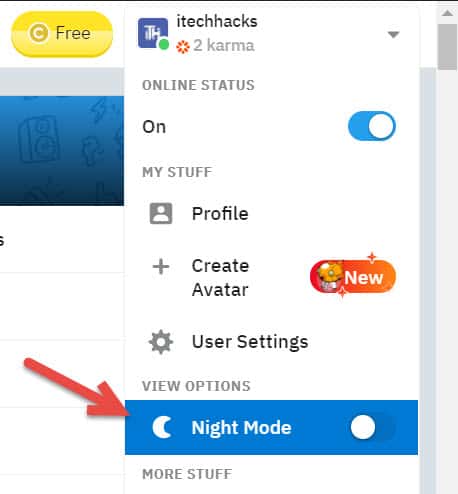
Step 4- From the drop-down box, click on Settings and then, check the checkbox for ‘ Night mode ‘ to immediately apply Dark mode on Reddit’s website version.
Turn Reddit Dark Mode on Android Application
Step 1- Download and install the latest version of Reddit on your Android device. It is available on the Google Play Store for free.
Step 2- Launch Reddit on your Android device and log in to your Reddit account or skip it.
Step 3- On the top-left corner of the home screen, click on your Avatar.
Step 4- Here, click on Settings . Then, click on the ‘ Auto Dark Mode ‘ option under the ‘ DARK MODE ‘ section.
Step 5- Make sure that this option is set to ‘ Off ‘ and then, turn on the toggle for ‘ Dark mode ‘ which you will find under the ‘ Auto Dark Mode ‘ option.
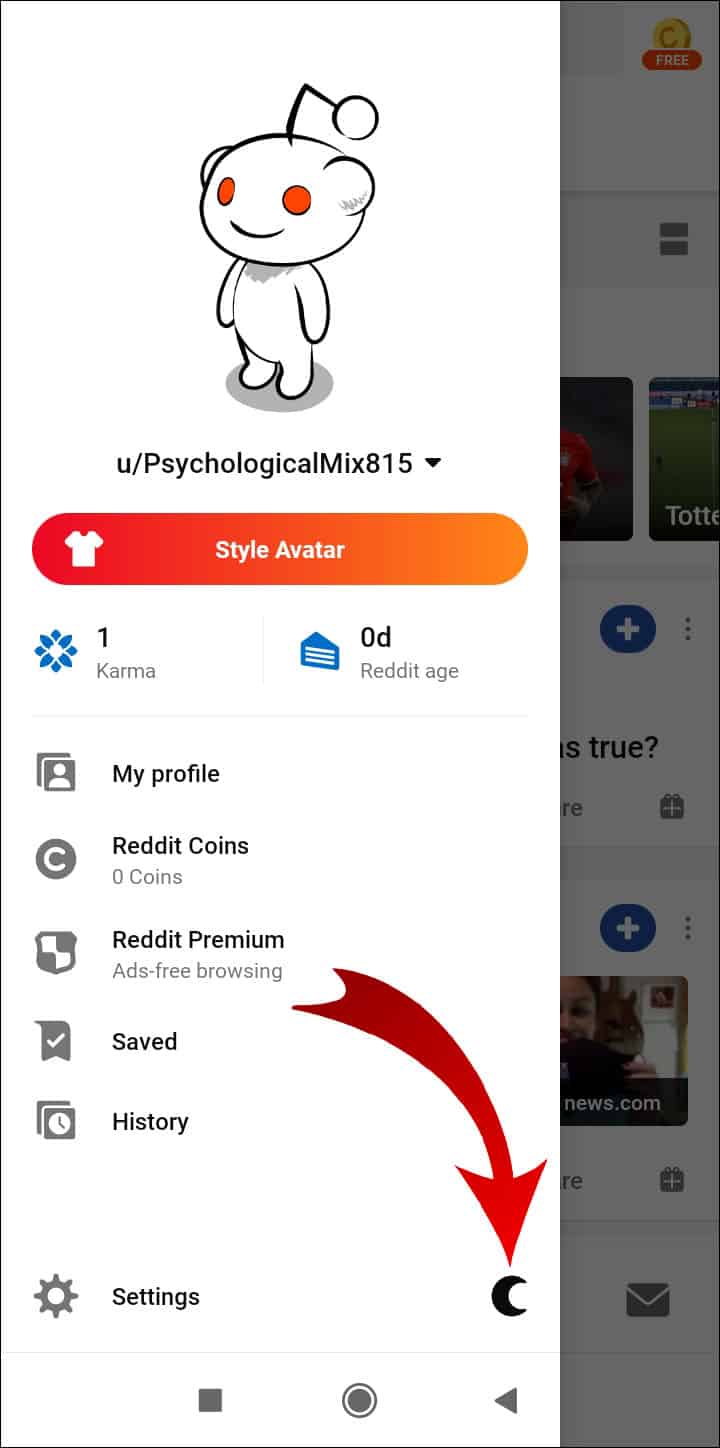
Step 6- If you want Reddit to enable Night mode only at night, change the ‘ Auto Dark Mode ‘ option to ‘ Sunrise/sunset .’ This will allow Reddit to enable and disable the Night mode depending on your time zone.
Step 7- The Night mode enables the Gray theme by default. If you have an OLED device, tap on the Dark theme option and select ‘ Midnight ‘ to enable the Black theme on Reddit.
Enable Dark Mode on Reddit for iOS App
Step 1- Download and install the latest version of Reddit on your iOS device. It is available on the App Store for free.
Step 2- Launch Reddit on your iOS device, log in to your Reddit account, or skip it.
Step 3- On the top-left corner of the home screen, click on your Avatar.
Step 4- Here, click on Settings . Then, disable the toggle for ‘ Auto night mode ‘ and enable the toggle for the ‘ Night mode ‘ option.

Use Dark Mode Extensions on Browser
You can easily enable dark mode with a number of free chrome or firefox browser extensions.
- Darkreader
- Night Shift Redux
- Dark Themes for Chrome
Conclusion:
The Dark Mode has been one of all Reddit users’ most awaited and anticipated features! Reddit provides its users with a Dark Gray or Black mode to choose from. Users having OLED display panels can enjoy the Black Mode.
- Reddit NBAstreams Banned? Here’s r/nbastreams Alternatives
- How To Change Your Reddit Username On PC/Mobile
- How To Fix Reddit Search Not Working
- How to Fix Can’t Open or Load Reddit Chat Window in Desktop PC or Mobile
- Top 6 Best r/SoccerStreams Alternatives for Live Streaming
