- OptiFine is a popular mod for Minecraft that enhances graphics and performance, with added video options.
- To download and install OptiFine, visit the official website, download the mod, ensure Minecraft is updated, and select the installation location.
- Two methods to install OptiFine are using the OptiFine installer or through Forge, allowing for improved graphics and gameplay in Minecraft.
Minecraft game that was released in the year 2011, and as of now, it has more than 112 million active members from all around the world! It this game, players explore a 3D world and have to survive in it. The only drawback of this game is that its graphics are not as eye-catching as its competitors. However, players can make use of OptiFine mod to overcome it.

What is OptiFine?
OptiFine is one of the most widely used mods for the Minecraft game. This mod optimizes Minecraft’s graphics and delivers a smooth performance. Also, it adds several video options to Minecraft’s settings.
NOTE: OptiFine is available only for computer installation. You cannot use OptiFine for Minecraft on your mobile or any other platform.
Below, we have listed some of the most useful methods which you can use to install OptiFine on your computer.
However, you must download the OptiFine mod and prepare your Minecraft before you start with the installation process. With the help of this tutorial, you will be able to install the following versions:
- Optifine 1.14.4
- Minecraft optifine 1.14.3
- Minecraft 1.15 optifine
- Optifine 1.14.2 download
- Optifine 1.16.1 & 1.16.2
How to Download OptiFine 1.16 and prepare Minecraft for it?
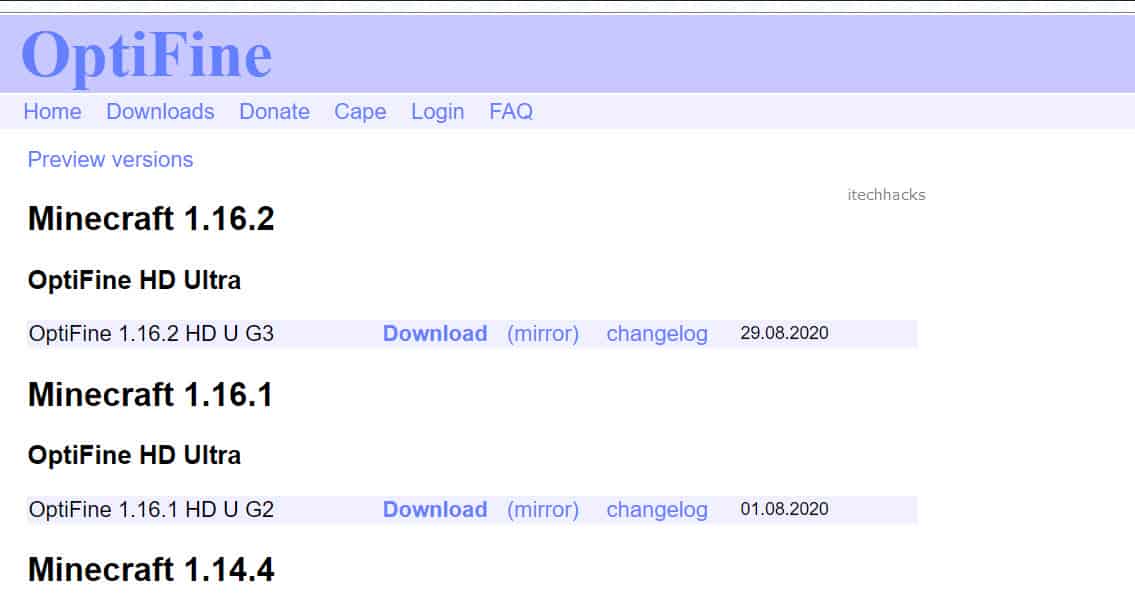
Step 1- Launch a web browser on your computer and go to this ‘ https://optifine.net/downloads ‘ link.
Step 2- Click on ‘ Download,’ which you will find at the top right corner of this window.
Step 3- Now, check if Minecraft is updated to its latest version. If not, update it.
Step 4- Determine the path where you have saved Minecraft installation files.
How to Install OptiFine 1.14/1.15/1.16 on Minecraft
Method 1: Using the OptiFine installer.
Step 1- On your computer, navigate to the location where you have downloaded OptiFine.
Step 2- Double-click on the setup file. You will notice that the installation window appears on your screen.

Step 3- Click on the horizontal dots next to the ‘ Folder ‘ address bar on the installation screen.
Step 4- On the new window that appears, enter the path of Minecraft’s directory address and click on the ‘ Open ‘ option. This step ensures that OptiFine gets installed to your Minecraft directory.
Step 5- You will be brought back to the installation screen. Here, click on the ‘Install’ option. Then, click on ‘ OK ‘ from the prompt.
Step 6- Now, launch Minecraft using the shortcut on your computer. On the homepage, click on the ‘ Installations ‘ tab.
Step 7- Click on the ‘Add New ‘ option. In doing so, a new window will appear on your screen.
Step 8- In the ‘ Name ‘ text box, enter any name for your OptiFine configuration.
Step 9- Click on the drop-down box next to the ‘ Version ‘ text box and select ‘ release OptiFine ‘ from the list.

Step 10- Once selected, click on the ‘ Create ‘ option to save the changes.
Step 11- To run OptiFine on Minecraft, click on the upward-facing arrow next to the ‘ PLAY ‘ option. Then, select OptiFine’s configuration from the list and click on the ‘ PLAY ‘ button.
Method 2: OptiFine using Forge
If you intend to use OptiFine on Minecraft through Forge, you must have this software installed on your computer.
Step 1- Copy the OptiFine setup file which you have downloaded on your computer.
Step 2- Launch Minecraft using the shortcut on your computer. On the homepage, click on the ‘ Installations ‘ tab.
Step 3- Here, click on the ‘ Latest Release ‘ option from the list of options that appear on your screen.
Step 4- On the new window, click on the arrow next to the ‘ Game Directory ‘ text box. The Minecraft installation folder will open on your computer.
Step 5- Create a new folder by the name ‘ mods ‘ in this folder. In the mods folder, paste the OptiFine setup file that you had copied in the first step.
Step 6- To run OptiFine on Minecraft through Forge, click on the upward-facing arrow next to the ‘ PLAY ‘ option. Then, select ‘ forge ‘ from the list and click on the ‘ PLAY ‘ button.
