- Telegram is a popular messaging app with over 150 million users in Russia, Iran, and India, offering security features and professional options.
- Top 7 tricks for Telegram include turning off last seen for specific members, sending mute messages in channels, editing sent messages, setting a username, securing the account with a passcode, replying from the home screen, and turning off message previews.
- These tricks can enhance user experience and privacy on Telegram, making it a worthy competitor to other messaging apps like WhatsApp.
Telegram is another competitor relaunched back in August 2014 with more than 150 Million active users in Russian, Iran, and India itself. Majority of Indian only use WhatsApp Messaging app to send Files, Images etc but only a few of them known with “Telegram App”. So in this article, we have covered each and every telegram tricks that you should know about before accessing it.

Best Telegram Messaging App Tricks
Telegram is fastest growing Social Messaging app on the Internet due to its supreme Security and Professional features than other Social Messaging apps like WhatsApp and Hike. Telegram allows you to Create Super Groups, Secret chat, custom Username and Self-Destructing messages. In this article, we have given Top best Features and Tricks related to Telegram. If you love to use this app, then you must know 7 Cool Telegram Tricks that we have provided in this Article.
Telegram is developed by Russian App developer Pavel Durov .The service also provides APIs to independent developers. In February 2017, Telegram stated that it had 100 million monthly active users, sending 15 billion messages per day.
Also Read: Top Best WhatsApp Tricks, Tips & Hacks
7 Best Telegram Messaging App Tricks
Trick 1: Turn OFF last seen for Particular Member.
The Telegram has the best feature to hide your last seen for a Particular Member as well as Total Members. This Feature is handy If you don’t want to show your Last Seen to a Particular member or All Members. This feature gives you Total Privacy and Independent. For Turn OFF last seen Follow the steps Below:
Step 1:

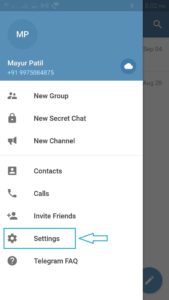
First, open the Telegram App. Now go to Settings then go to Privacy and Security Tab.
Step 2 :
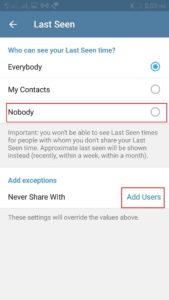
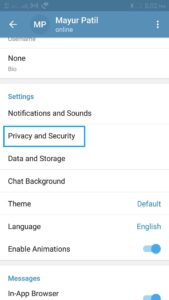
Open the Privacy and Security Tab and then go to Last seen option to Turn OFF last seen.
Step 3 :
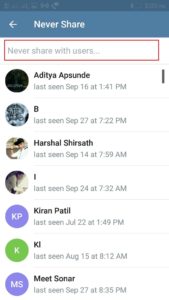
There should be an Exception option. Now tap on the option and Choose User/Member that you want to Turn OFF and then add and then choose option Add User.
Trick 2: How to Send Mute Messages in Channels

In Telegram, you can Easily send Mute Messages in channels using a Simple trick. By using this Trick, Receiver doesn’t get any Notification sound. This trick is very useful if your Message is not Urgent or Important to read. Follow the below Instructions to Send Mute messages in channels.
First, open the Telegram App Then Select the Receiver/channel to send the Mute messages. To send a mute message in channels, tap the mute/unmute button beside the text Bar and then Send your Message. Now Receiver will get your Message without any Notification Sound.
Trick 3: How to Edit Already Sent Message
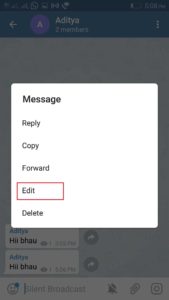
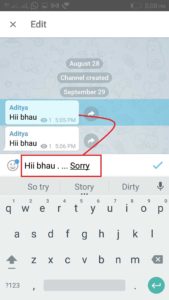
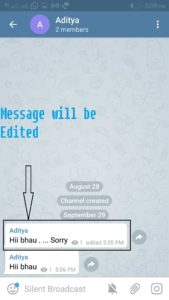
Telegram offers another best Feature to Edit Already sent Message. Most of People don’t know that They can edit their Sent Messages. So, In this trick, I have given easy steps to Edit already sent Message.
Step 1 :
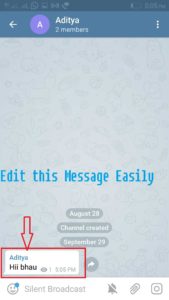
To Edit changes in Already Sent Message, you have open App Then Send the same message again to that Person which you want to change.
Step 2 :
Trick 4: How to set your own Username on Telegram
The telegram also allows you to Set up your Username. Setting up your Username on Telegram gives you Unique name and Identity which helps you to easily connect with Friends, Family and Relatives. Now follow my Steps to Easily set your own Username on Telegram.
Step 1 :
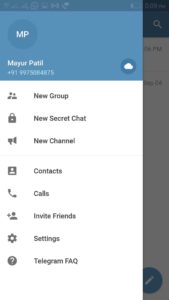
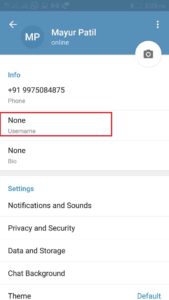
First, open the Telegram App and goto the Settings .
Step 2 :
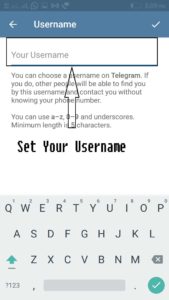
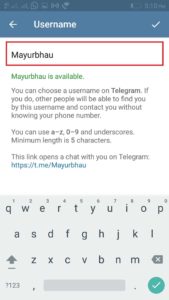
Now, In the Settings option, you have to tap on the Username Tab. In this Tab, you can easily change your Telegram Username.
Also Read: Top 30 Best Free Movie Streaming and Downloading Websites
Trick 5: Secure your Telegram Account using passcode
Telegram gives you next level of Security rather than Facebook and WhatsApp by setting a Passcode for your chats. You can Secure and Protect your Conversations by setting Passcode without any using Third-party App. Let’s see the trick to Secure your Telegram Account.
Step 1 :
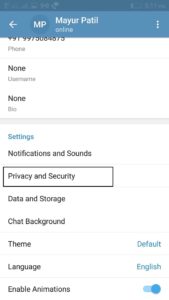
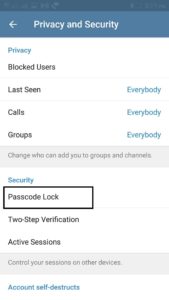
First, open the Telegram then go to Settings option. Now you have to tap on Privacy and Security Tab.
Step 2 :
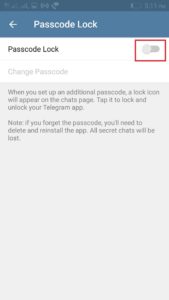
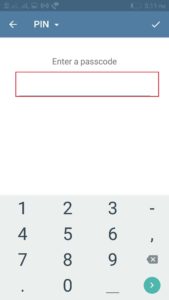
In Privacy and Security menu tap on the Passcode Lock . In this Passcode Lock, you can Easily set your 4 Digit PIN . After Passcode will be activated to your mobile phone.
Trick 6: Directly Reply from your Home Screen
Opening the App and reply to Text message consumes your Most time in a day. If you want to save your Time by quick reply to upcoming Messages Then This trick will very helpful for you. In this trick, I will show you to How can you Directly reply from your Home Screen by Activating Pop-Up Notifications.
Step 1 :
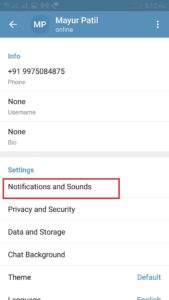
Open the Telegram and go to Settings menu. In Settings menu tap on the Notifications and Sounds.
Step 2 :

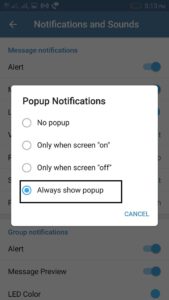
In Notifications and Sounds, menu tap on the Pop-Up Notifications . In this option you have to set to Always Show Pop-Up.
After doing this Successfully, You will be able to Reply of any messages from your Home screen Directly.
Also Read: How To Recover Deleted WhatsApp Chats/Messages?
Trick 7: How to Turn OFF Message Preview
Telegram gives you Turn on/off message preview. All the messages of Telegram will appear on Lock screen using Message Preview Feature. The biggest disadvantage of Turning on message preview features is that anyone can easily view your personal Messages on Notification Area. If you do not want show messages on Front screen then Follow my steps Below to Turn OFF message Preview.
Step 1 :
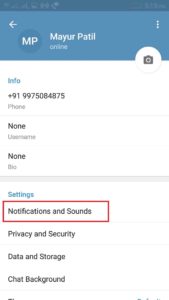
Open the telegram App and then go to Settings. In settings tap on the Notifications and Sounds.
Step 2
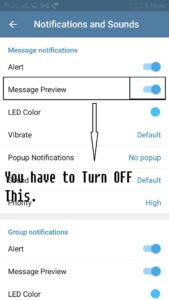
Now, In this menu, you have to you have to Disable an option called Message Preview.
Also Read: How To Make Your WhatsApp with USA (+1) Number
Wrap Up: Well, These Telegram tricks are just Awesome! I know you are one of the habitual users of WhatsApp and these tricks might change your mind to break through the competition of the other messaging apps. That’s it in this article. Hope you love to apply these methods. Do share it with your friends.
